


I use medication reference apps for one simple reason: when a medicine name appears on a prescription, a package, or an old bottle in the cabinet, I want a clear explanation before I make assumptions. Drugs.com Medication Guide is built for that moment. It is a free medical app from Drugs.com that combines drug-information lookup, pill identification, and medication management in one place. After spending time with it, I see it as a practical reference companion rather than a replacement for a pharmacist or doctor.
That distinction matters. The app is useful when I need to understand a medicine, check whether two products are worth asking a professional about, or organize the information I already have. It is less suitable when I want a fully personalized treatment plan, a diagnosis, or reassurance that a serious symptom is harmless. Its strongest quality is convenience: it puts several everyday medication tasks together instead of making me jump between a search engine, a pill-identification website, and a separate reminder tool.
How the app feels during ordinary use
Fast answers without a complicated starting point
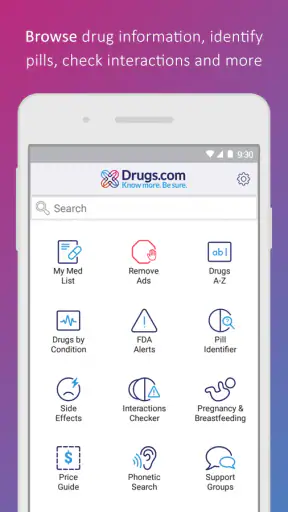
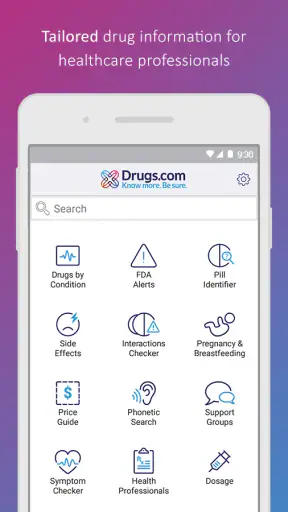
The first thing I noticed is that the app’s purpose is immediately understandable. I can search for a medicine by name, move toward pill identification, or work with a medication list. That direct layout helps when I am already holding a prescription and do not want to learn a complicated interface before finding the relevant information.
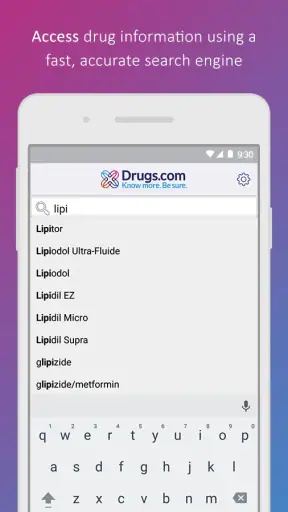
Search speed matters in this category because medication questions often happen in small gaps: at the pharmacy counter, before leaving a clinic, or while sorting products at home. In my experience, the app is most comfortable when I use it as a focused reference. I choose the medicine, read the relevant sections, and leave. It does not feel like an app designed to keep me browsing for its own sake.
The best performance expectation is quick access to reference material, not instant medical judgment. A result can be easy to open while still requiring careful reading. Drug information includes warnings, interactions, directions, and exceptions, so rushing through the page defeats the reason for using the app. I appreciate that the app supports a slower second step after the initial search: checking the details that apply to my situation instead of stopping at a short description.
What happens when I use it heavily
Light use is straightforward, but medication research can become demanding when I compare several products or move between different kinds of information. For example, I might look up a prescription, inspect its warnings, check another medicine taken by a family member, and then return to a saved medication list. That kind of session tests navigation more than raw speed.
The app is particularly useful in a realistic household scenario. Imagine that I am helping a parent sort a weekly collection of medicines. I can identify an unfamiliar tablet, look up the medicine, and keep the information connected to a medication-management workflow rather than writing a name on a loose piece of paper. I would still verify the result with the packaging and a pharmacist, but the app gives me a much better starting point than guessing from color or shape.
There is also a practical trade-off in repeated searches. A broad reference library is valuable because it covers more than the one medicine I currently take, but that breadth means I need to stay attentive to the exact product and formulation. Similar names can lead to very different medicines. I do not treat the first matching result as proof that I have identified a pill correctly; I compare the visible details and use professional confirmation when the stakes are high.
During heavier use, the most important resource is my attention rather than the phone’s battery. Reading a long medicine entry, checking warnings, and comparing information can take more time than opening a basic reminder app. That is not a flaw by itself, but it changes who will enjoy the app. Someone who wants only a notification at a certain hour may find a simpler medication tracker more efficient. Someone who wants context around the medicine will get more value here.
Stability and recovery when I return later
For a medical reference tool, reliability means more than opening quickly. I also want to return to the same medication information without losing track of what I was doing. Drugs.com Medication Guide works best as a repeat-use reference: I can come back when a new question appears, rather than treating it as a one-time search.
My preferred workflow is to search before I need the information urgently. If a medicine is new to me, I read the entry when I am calm, note the questions that remain, and ask a healthcare professional about anything unclear. This makes the app more dependable in practice because I am not relying on a rushed interpretation during a stressful moment.
The recovery question is especially important if I am interrupted. A phone call, a conversation with a pharmacist, or a child needing attention can break a medication-checking session. I do not assume that an interrupted screen is enough to preserve my understanding. When I return, I verify the medicine name and start from the relevant entry again. That small habit prevents a partially read warning from being mistaken for a complete answer.
I also recommend keeping the physical package nearby during pill identification. An app can help narrow the possibilities, but a wrong selection can create a false sense of certainty. The safest recovery from doubt is not repeated guessing; it is stopping and asking a pharmacist or clinician to confirm the pill.
Medication management is useful, but not the same as treatment supervision
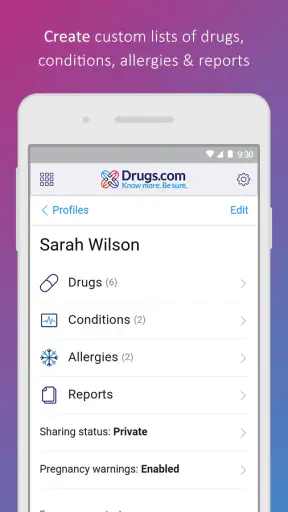
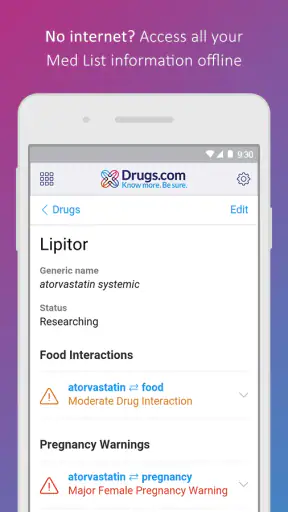
The medication-management side is one of the reasons I would choose this app over a plain drug encyclopedia. It gives the information a personal context: these are the medicines I am dealing with, not just random entries in a database. That can help when preparing for a medical appointment or trying to remember what a product is used for.
Still, I would not confuse organization with clinical monitoring. The app can help me keep medication details in view, but it does not turn my phone into a doctor. It cannot examine me, interpret every symptom, or decide whether I should change a dose. I use it to prepare better questions and reduce avoidable confusion, not to authorize a treatment change.
A useful advanced habit is to use the app before an appointment, then bring the unresolved questions to the clinician. If I see a warning that seems relevant, I write down the exact medicine name and ask how it applies to me. This is more effective than showing a professional a vague concern based on a quick web search. The app becomes a conversation aid rather than a substitute for the conversation.
Pill identification requires careful handling
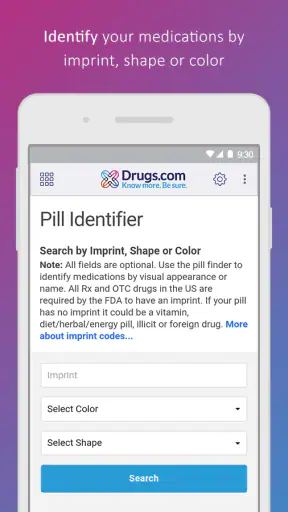
Pill identification is appealing because it addresses a common problem: a tablet has been separated from its original container, or two similar-looking medicines have been placed together. The feature can save time while I investigate, but I treat it as an identification aid, not a final authority.
The non-obvious risk is that appearance alone is not always enough for a safe decision. Markings, shape, color, and formulation details all matter, and a damaged or poorly lit pill can make the process less dependable. I use good lighting, inspect both sides when possible, and compare the app’s result with the container or prescription record. If the details do not match, I do not take the pill simply because one result looks plausible.
This is also where the app is not the right choice for an emergency. If someone has taken an unknown medicine, is having trouble breathing, is unconscious, or has severe symptoms, I would contact emergency services or poison-control professionals rather than spending time trying to solve the mystery inside an app.
Reading the information without getting lost
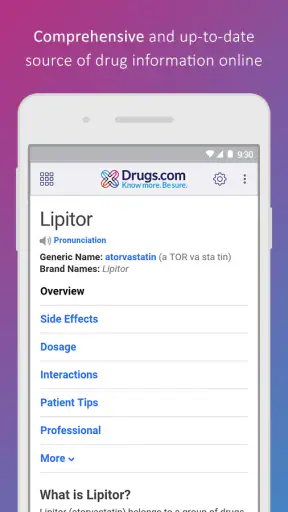
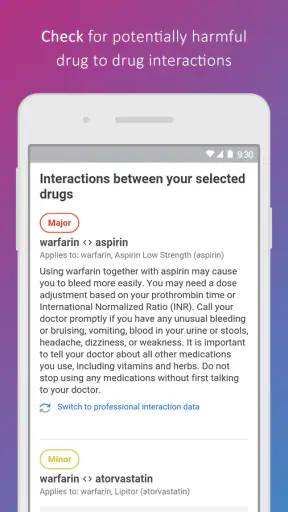
Drug entries can contain more detail than a casual user expects. I find that helpful when I need to investigate a medicine properly, but it can also create friction. The right way to use the app is to begin with the question I actually have. Am I checking what the medicine is for, looking at a warning, trying to understand an interaction, or preparing to ask about side effects? Starting with one question keeps the reading manageable.
I also avoid relying on isolated sentences. A warning can depend on age, health conditions, other medicines, pregnancy, allergies, or the reason the medicine was prescribed. The app is valuable because it brings the reference material together, but I still need to interpret it in context. When the language feels too technical, that is a signal to ask a professional rather than search for a more comforting sentence elsewhere.
For family use, I would keep each person’s medicines mentally separate even when using the same phone. Mixing a parent’s prescription with a child’s product or a partner’s over-the-counter medicine can create confusion. The app helps organize information, but the user still has to maintain that separation carefully.
Device age, installation, and resource expectations
Drugs.com Medication Guide supports devices running Android 7.0 or later, which makes it accessible to people who are not using a brand-new phone. That is useful for an older household device dedicated to health information. The current version is 3.1.65, so I would keep the app updated through the normal app-store process to benefit from the version available for my device.
I do not see it as a resource-heavy entertainment app. Its main work is searching, displaying reference information, identifying pills, and handling medication-related organization. That makes it a sensible candidate for a modest phone, although the experience will still depend on the device, operating system, storage, and connection available at the time. I would not choose a very old phone for a critical medical dependency without testing it first.
The Teen content rating is worth noticing for families. It does not mean the app is intended to guide teenagers through self-treatment. Medical information can be sensitive and easy to misunderstand, so younger users should involve a parent, pharmacist, nurse, or doctor when the question concerns an actual medicine or symptom.
Because it is free, the barrier to trying it is low. That does not remove the need for judgment. A free reference app can be useful, but I would not let the absence of a price make me treat its information as personalized medical advice.
How it compares with familiar alternatives
The usual alternative is a general web search. A search engine may return an answer faster for a simple question, but it also mixes official information, commercial pages, discussion boards, and snippets taken out of context. I prefer this app when I want a dedicated medication reference with a more focused path from the medicine name to the information I am trying to understand.
A second alternative is a pharmacy or clinic’s own app. Those tools may be better for prescription refills, appointment details, or messages with a care team. Drugs.com Medication Guide is more useful when my goal is broad medication research, pill identification, or keeping a wider reference at hand. I would use both if necessary rather than expecting one app to cover every part of healthcare administration.
A basic reminder app is another comparison point. A reminder-focused tool may be faster for alarms and daily routine, especially for someone who already knows the medicine and only needs help remembering it. This app earns its place when the user wants to understand the medicine as well as manage it. If reminders are the only requirement, the additional reference material may feel like unnecessary complexity.
Finally, a pharmacist remains the better alternative whenever identification is uncertain, a warning seems urgent, or several personal factors affect the answer. The app can prepare me for that conversation, but it cannot replace the professional who knows my history and can ask follow-up questions.
Who should use it, and who should skip it
I would recommend Drugs.com Medication Guide to adults who regularly handle prescriptions, caregivers organizing medicines for a family member, and anyone who wants a dependable starting point for medication questions. It is also useful for preparing a concise list of questions before a consultation. The combination of lookup, pill identification, and medication management makes more sense for these users than installing three disconnected tools.
I would be more cautious about recommending it to someone who tends to self-diagnose from search results or change a dose after reading a warning. The app’s detail can support good decisions, but it can also encourage overconfidence if the user ignores context. People with complex treatment plans should use it alongside their care team, not instead of one.
I would also skip it if all I want is a silent, minimal reminder system. A dedicated reminder tool may feel cleaner and demand less reading. Likewise, anyone facing a possible overdose, severe reaction, or urgent symptom should seek immediate professional help rather than depending on a reference screen.
My performance verdict
After using it as a reference, identification aid, and medication organizer, I find the app stable in concept and efficient for focused tasks. Its speed is most valuable at the beginning of a question, while its real strength appears in the detail that follows. It does not need to be flashy to be useful; the benefit comes from having medication information available in a purpose-built environment.
Its limitations are tied to the same strength. The information can require careful reading, pill identification can never remove the need for confirmation, and medication management is not clinical supervision. Users who expect one tap to settle a personal medical decision will be disappointed. Users who want to research responsibly and arrive at appointments better prepared will get much more from it.
The app has earned a 4.7 average from around thirty-seven thousand ratings, with more than a million installs, which fits my impression that it serves a broad practical need. It was released on February 24, 2013, and the developer is Drugs.com. For a free medical app rated Teen, that combination of longevity, reach, and focused functionality makes it easy for me to recommend as a companion reference.
My final recommendation is simple: use it to identify, organize, and understand medicines, then use a qualified professional for decisions that affect your health. If that is the role you want from a medication app, this is a strong and sensible choice. If you need prescription refills, direct clinician messaging, or a bare-bones alarm, another tool may fit your routine better.


